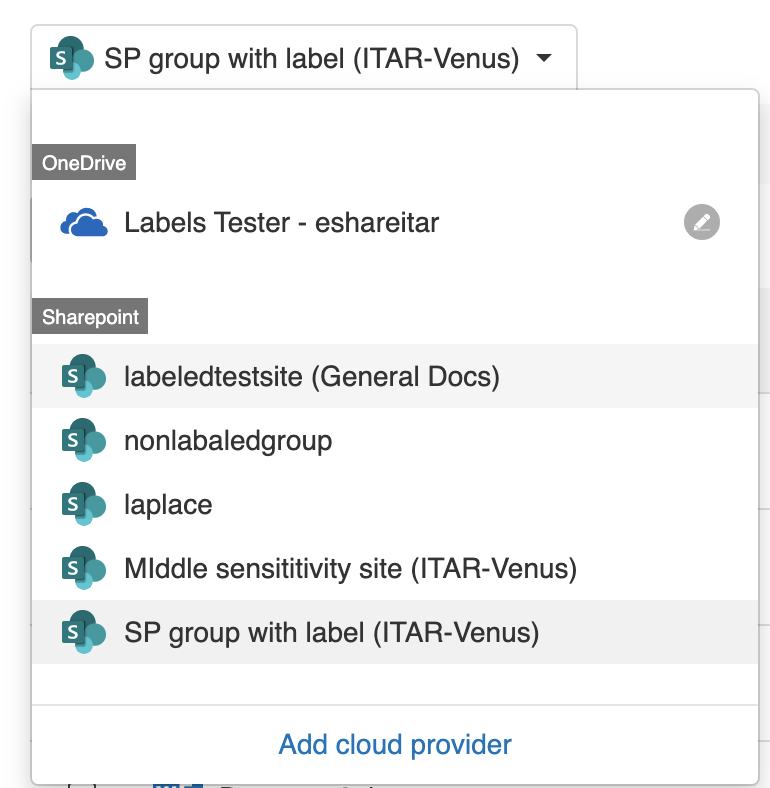
Show Labels in Cloud Provider View In Cloud provider View, when a user opens the drop down menu to select a cloud provider, he will now be able to view any Labels assigned to a SharePoint site. Additionally, the rename button next to a Cloud Provider will no longer be present for SharePoint sites. See the following screenshot for an example,
Enhancements
Reply button moved The Reply button in Secure conversation within a Trusted Share has been moved from underneath each message to the top right of the page. This redesign was done to alleviate some user confusion and provide a more consistent UI, since all replies posted in Secure Conversations are placed at the top of the page. When clicking the reply button, if a user has scrolled to the bottom of the page to view a message- he will auto scroll to the top of the page to enable him to type his reply.
Prevent Owners to be added as Recipients in Trusted Shares (Humana/Takeda) Owners of Trusted Shares cannot add their corporate or personal Emails as Recipients when creating a Trusted Share. When attempting to do so, they will receive the message "The owner can't be added as a Recipient" either during Trusted Share creation or after a Trusted Share has been created and the user attempts to add himself as a Recipient via the Recipients module of the Trusted Share. This was done to prevent users from circumventing the Policy "Download to corporate Devices Only" when enabled for an Organization.
Branded Email notifications Organizations that have the proper domain set up in Mailgun, can opt to display their own domain instead of the no-reply@ncryptedcloud.com when users receive notification emails for changes in Trusted Shares.
Error message for Blocked Domains During the creation of a Trusted Share, when a users enters an Email address that belongs to a Domain that is blocked from the Organization Administrator in Sharing Policies, they will now receive an error message informing them the Domain is blocked. The message reads "The highlighted email(s) belong to a domain blocked by your Organization. Remove them to send the Trusted Share" .