New Organization configuration option A new Organization configuration options has been introduced, located in Device Policy in the Org Admin management dashboard. The setting called Enforce Login for internal Recipients, is now available for use, giving Org Admins the ability to always require internal users to login when attempting to view a Trusted Share. This setting has a higher priority than the Policy "require Login" set during the creation of a Trusted Share, and will always override said policy. (e.g. "Login Required" Policy is set to off in the Trusted Share and the Enforce Login setting is set to on. Users that belong to the Organization will be required to login in order to view the Trusted Share.)
Shared Mailbox Support Added support for Shared Mailboxes through SharePoint. Organization Admins can now go to Manage Organization-->Secure Email-->Shared Mailboxes Sharepoint Site and specify a SharePoint site that will contain a Folder that holds all files uploaded through SMG created Trusted Shares originating from a Shared Mailbox.
Users that belong to a Shared Mailbox are treated as Trusted Share co-owners with all the relevant options available to them.
Any replies made in the Trusted Share Secure Conversations from Users that belong to the Shared Mailbox, will have the Shared Mailbox Mail Address displayed.
Users that belong to the Shared Mailbox will not be displayed as Recipients in the Trusted Share.
Enhancements
Removed "Active" filter from SharedWithMe Removed the "Active" filter from the search filtering options in SharedWithMe. The Trusted Shares displayed should always be the active ones and this setting is considered redundant.
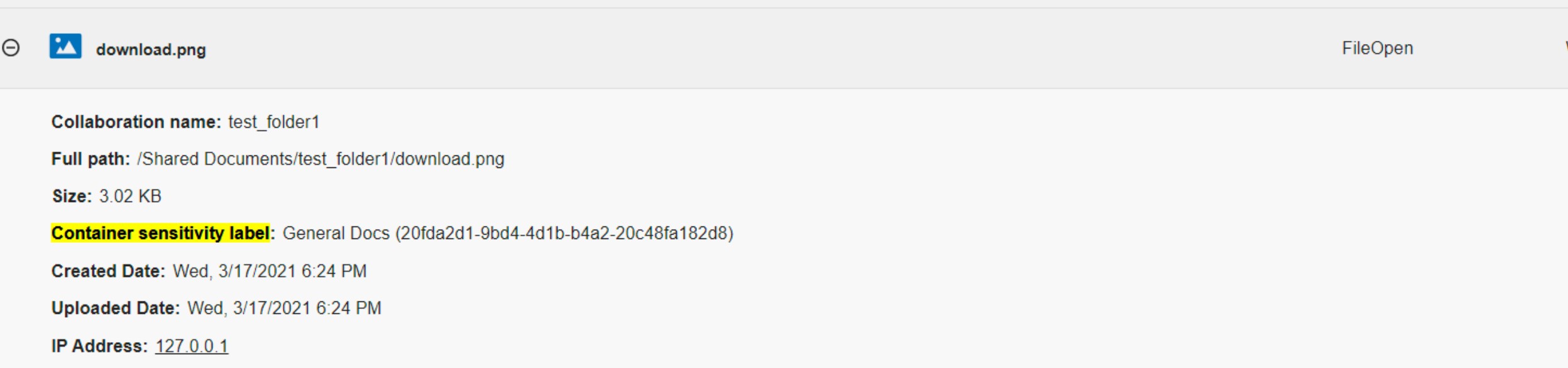
Labels from SharePoint Documents present in SharePoint sites will now have their group assigned Labels shown in Auditing. The new Audit event is named "Container sensitivity Label" and will contain the id and name of the Label as shown in the picture below. Note: If the Label is created recently and not yet propagated by e-Share it might take some time for the Name of the Label to be shown in the Audit event. In that case only the id will be displayed. Trusted Shares initiated from Cloud Web Portal that contain Documents originating from SharePoint with Labels assigned, will have their Sharing Policies restricted to the policy assigned with the associated Label. This limitation does not apply to Trusted Shares created through our API.
Improved Performance for Paginated results Folders that contain a large amount of files, will now display paginated results more consistently while loading the list of all the files.